VRCMeshDeformer
- ダウンロード商品¥ 250
VRC Mesh Deformer
✦ VRC Mesh Deformer とは
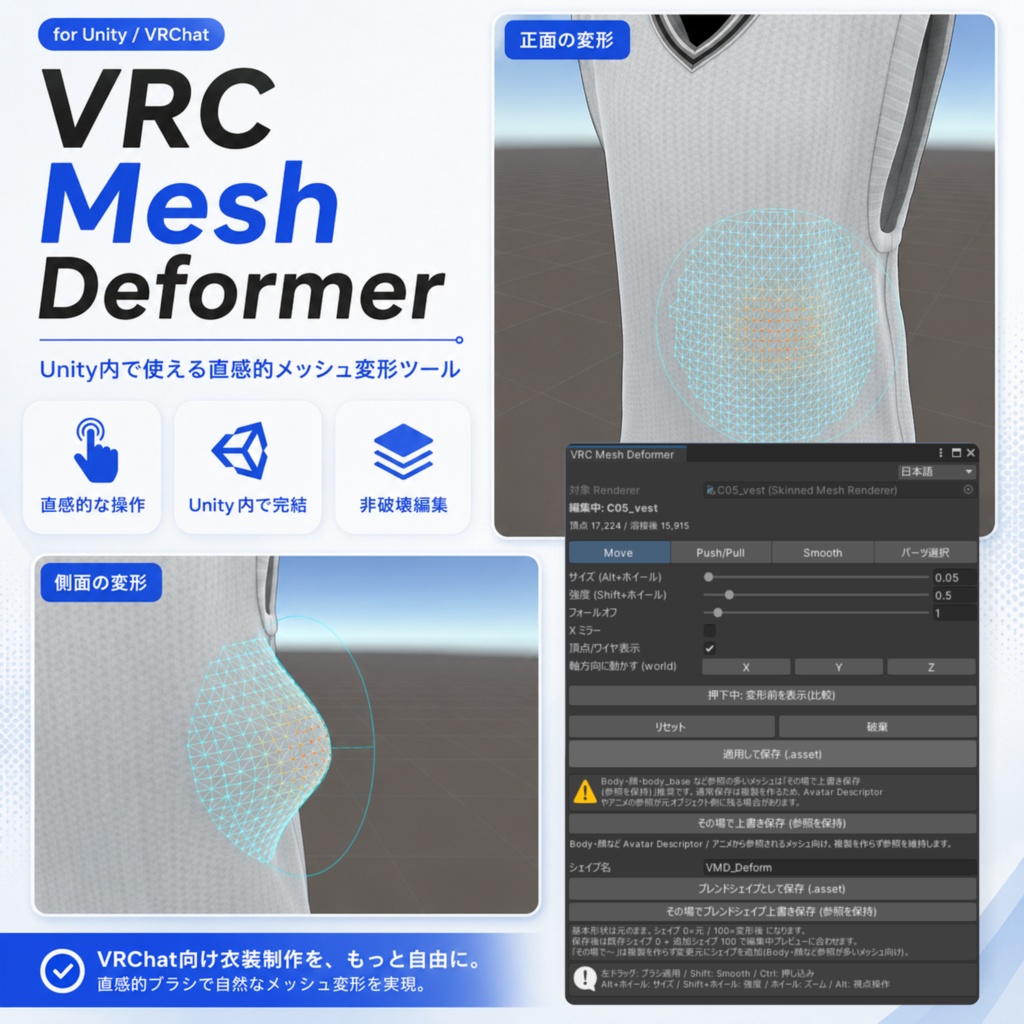
「衣装が少しだけ体にめり込む」 「アクセサリーの形をほんの少し直したい」 「そのためだけに Blender に戻るのは面倒…」 VRC Mesh Deformer は、そんな "あと少し" を Unity の中だけで解決する、 ブラシ式のメッシュ変形ツールです。 衣装の小さなめり込み修正や、アクセサリーの形状微調整など、 「少しだけ直したい」場面向けのツールです。 体型そのものの大きな変更や、広範囲のシルエット変更、メッシュ構造の整理は Blender 等の DCC ツールでの編集をおすすめします。 シーンビュー上でなぞるだけで、粘土をさわるような感覚で メッシュを直感的に変形できます。 Blender へのエクスポート・再インポートは不要です。
✦ できること
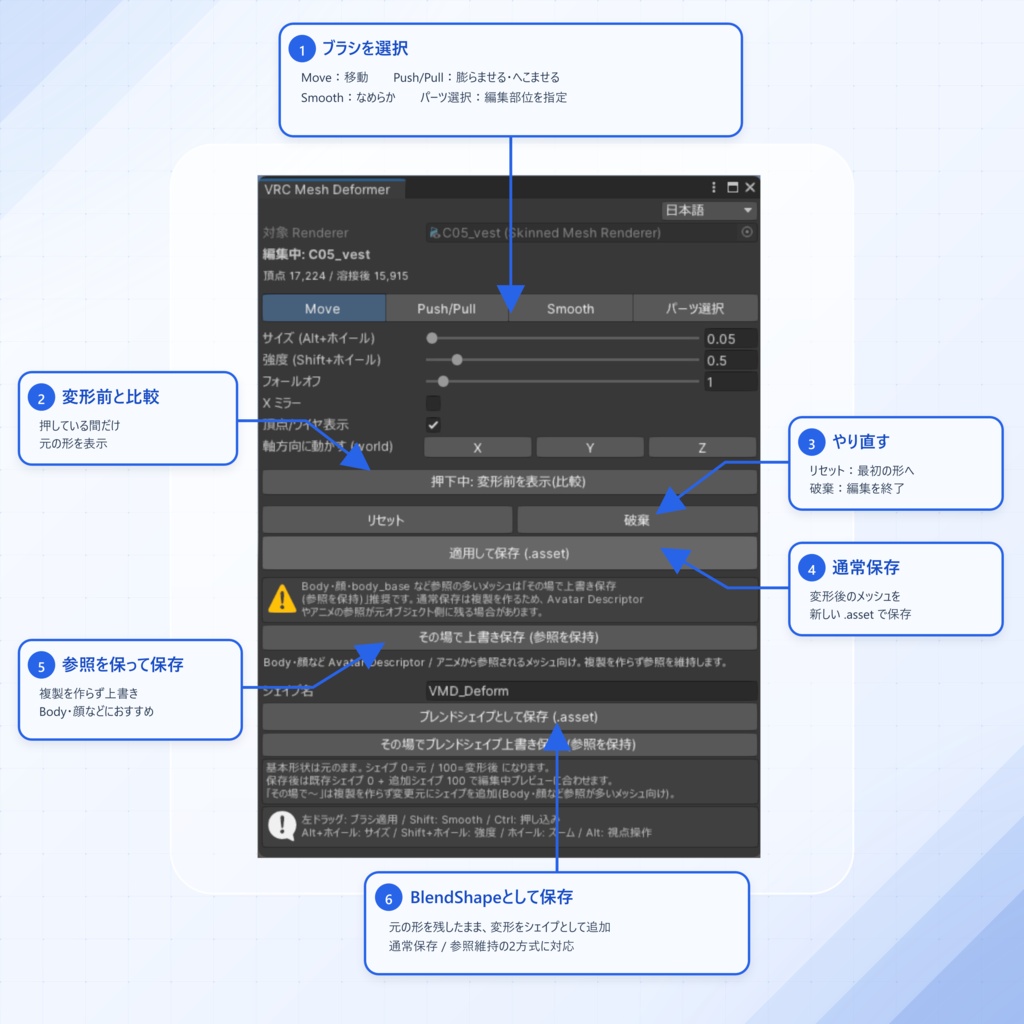
◆ 3種類のブラシ ・Move …… 掴んだ部分をドラッグ方向へ移動(裾を引っ張る・輪郭を整える) ・Push/Pull …… 表面を膨らませる / Ctrl で押し込む(めり込み解消に最適) ・Smooth …… 表面のガタつきをなめらかにならす(仕上げ用) ※どのブラシ使用中も Shift を押すだけで一時的に Smooth に切替できます ◆ X ミラー編集 左右対称の位置へ自動で同じ編集を適用。左右の衣装調整が一度で終わります。 ◆ パーツ選択(UVアイランド単位の範囲限定) 編集したいパーツ(UVで分かれた塊)をクリックで選ぶと、そのパーツだけをブラシ編集の対象にできます。 袖だけ・体の一部だけを調整して、隣のパーツは動かさない——といった範囲限定が手軽に行えます。 ◆ 非破壊設計 元のメッシュ(FBX等)には一切手を加えません。 編集は複製に対して行われ、「破棄」ボタンでいつでも完全に元どおり。 安心して試行錯誤できます。 ◆ UV継ぎ目の自動保護 UVやマテリアル境界で分かれている頂点を自動でまとめて編集。 「編集したら継ぎ目がパックリ割れた」が起こりません。法線も割れません。 ◆ ポーズ中でも編集OK ボーンでポーズを付けた状態のまま編集できます。 「実際に着せたポーズでのめり込み」をその場で直せます。 ◆ 細かな調整機能 ・ブラシサイズ(Alt+ホイール)/ 強度(Shift+ホイール)を素早く調整(ホイール単独は通常どおりカメラズーム) ・フォールオフ(効果の減衰カーブ)調整 ・軸方向移動(X/Y/Z、選んだ軸方向だけに移動) ・ブラシ範囲の頂点/ワイヤーフレーム可視化(影響度を色で表示) ・変形前との比較表示ボタン ・編集開始前の既存 BlendShape を合成して確認できる比較表示 ◆ Body・顔も安心して編集できる「その場上書き保存」 通常の保存は複製オブジェクトを作りますが、Body・顔メッシュは リップシンク(ビゼム)・まばたき(アイルック)・衣装のめり込み解消トグルなど、 他の機能から直接参照されていることが多く、複製だと参照が引き継がれません。 「その場で上書き保存」を選べば、複製を作らず変更元へ直接反映するため、 これらの参照を維持したまま安全に編集できます(確認ダイアログ付き・非破壊・Undo 対応)。 参照されているメッシュを編集開始しようとすると、事前に警告も表示されます。 ◆ ブレンドシェイプとして保存(オマケ機能) 変形結果を「元の形状 + シェイプキー(0=元 / 100=変形後)」として保存可能。 アニメーションやトグルと組み合わせて、着せ替えに合わせた めり込み解消シェイプなどが作れます(SkinnedMeshRenderer のみ)。 こちらも複製を作らない「その場上書き」版を選べます。 ◆ 日本語 / English 対応 ツールの UI はウィンドウ上部のポップアップで日英切替できます。 取扱説明書・利用規約も日英両方を同梱。 ◆ 安心の編集フロー ・ストローク単位の Undo / Redo(Ctrl+Z / Ctrl+Y) ・保存前に面反転・面潰れ・過大変位・ボーンウェイト異常を自動検査 ・保存は .asset 形式。BlendShape・5本以上を含むボーンウェイト・UV0~7・マテリアル・頂点カラーを保持 ・SkinnedMeshRenderer の Bounds を拡張し、LODGroup・同一オブジェクト配下の MeshCollider 参照も保存先へ更新 ・保存すると編集後モデルを複製として同じ階層に生成。 変更元は非表示 + EditorOnly タグで「いつでも戻せる控え」として残ります (EditorOnly は VRChat のアップロードに含まれません) ・同名上書き時は自動でタイムスタンプ付きバックアップを作成 ◆ VRChat へのアップロードに影響なし Editor 専用ツールのため、ビルド・アップロードには一切干渉しません。 VRChat SDK にも依存しないため、SDK バージョンを問わず使用できます。
✦ 動作環境
・Unity 2022.3 LTS(VRChat Creator Companion 標準バージョン) ・依存パッケージなし(unitypackage をインポートするだけで動作) ・対象: SkinnedMeshRenderer / MeshFilter 付き Renderer
✦ 同梱内容
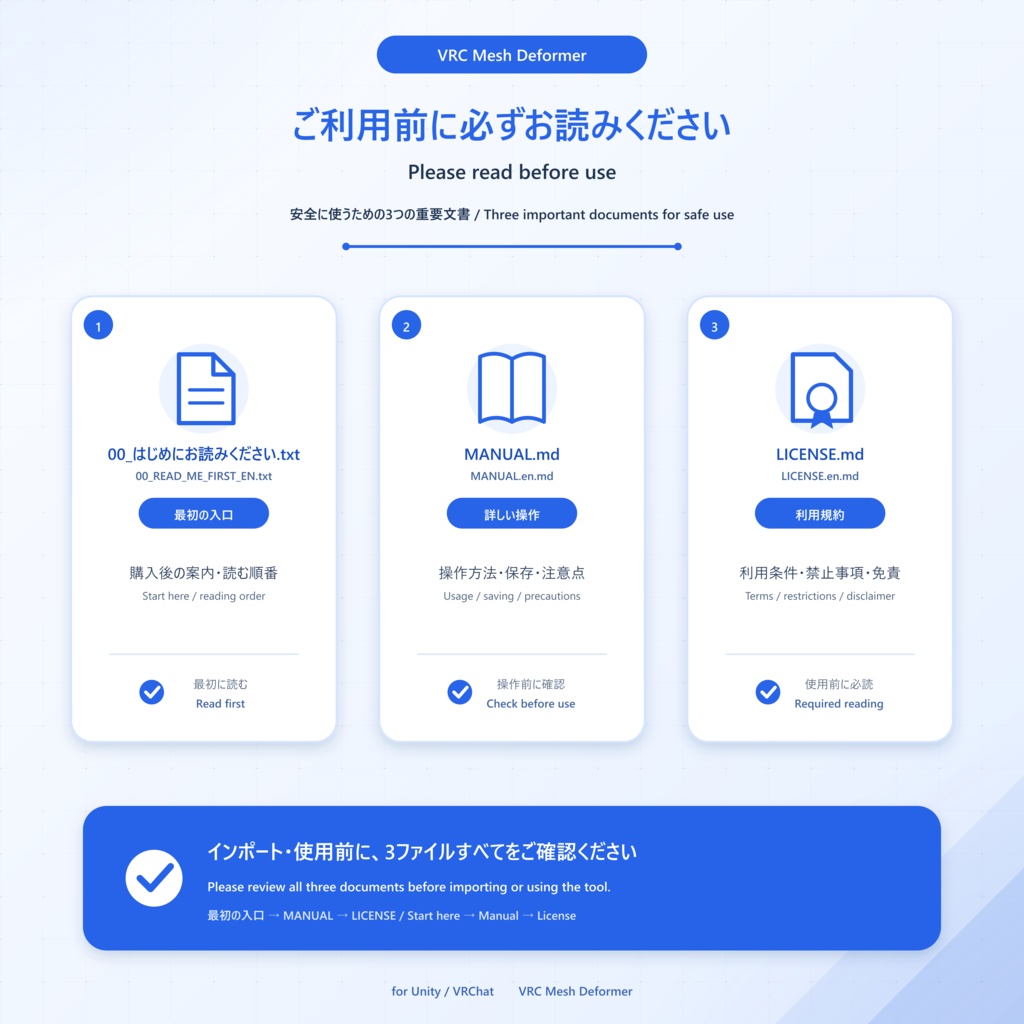
VRCMeshDeformer 本体パッケージ(.zip) ・unitypackage(ツール本体・UI は日本語/英語 切替対応) ・00_はじめにお読みください.txt / 00_READ_ME_FIRST_EN.txt(最初に読む案内・日本語 / 英語) ・導入手順画像 10枚(スクリーンショット付きで導入を解説) ・取扱説明書 MANUAL.md / MANUAL.en.md(日本語 / 英語) ・利用規約 LICENSE.md / LICENSE.en.md(日本語 / 英語) ・更新履歴 CHANGELOG.md / CHANGELOG.en.md(日本語 / 英語)
✦ 商品画像・作例に使用した素材(クレジット)
商品画像・導入説明のスクリーンショットには、以下の衣装をお借りしています。 ・【3Dコスチューム】05 ロングニットベストセット / KeenooSHOP 様 https://keenooshop.booth.pm/ #KeenooSHOP ※ 本ツールに当該衣装データは含まれません(画面例としての表示のみです)。
✦ 使用上の注意
・本ツールは Unity 2022.3 LTS で動作確認しています。それ以外のバージョンでの動作は保証いたしません。 ・インポート時に Console へ「[Assembly Updater] ... Ignoring assembly ... VRCMeshDeformer.Editor.dll ...」という警告が表示される場合がありますが、Unity の起動オプション(-disable-assembly-updater)による無害な通知で、ツールの動作には影響しません。 ・本ツールは、小さなめり込み修正・形状微調整などの局所編集を目的としています。大きな体型変更、広範囲の引き伸ばし、メッシュ構造の作り直しでは、法線・BlendShape・ウェイトとの見た目の整合が崩れやすいため、Blender 等での編集をおすすめします。 ・編集セッション中のシーン保存・Play モード開始は非対応です(Play 開始は確認ダイアログで保護されますが、シーン保存は保護されません)。必ず「保存」または「破棄」でセッションを終了してから行ってください。 ・BlendShape は基本形状のみ編集されます。大きく変形した箇所では、シェイプキー使用時に形状が崩れる場合があります。編集中はアクティブなシェイプが一時的にオフになります。通常保存で作られる複製、通常メッシュのその場上書き保存後、ブレンドシェイプ保存後は、既存シェイプ weight 0 の編集中プレビューに合わせます。ブレンドシェイプ保存後は追加シェイプだけ 100 になります。破棄・Undo では元の weight を復元します。 ・UV は保持されますが、頂点を大きく移動するとテクスチャは伸縮します。透明・カットアウト材質や、視差・変位を行うシェーダーでは、見えている表面とブラシが判定するメッシュ表面に差が出る場合があります。 ・元メッシュの法線・接線方向を変形に追従させますが、強い押し込み・面反転・自己交差では陰影が崩れる場合があります。保存前検査で警告が出た場合は形状を確認してください。 ・同じ位置に重なった独立面は、位置とボーンウェイトが同一の場合、一緒に動くことがあります。 ・ご使用前に Unity プロジェクトのバックアップを推奨します。 ・本ツールの使用により生じたいかなる損害(データ破損・プロジェクト破損等)についても、作者は責任を負いかねます。あらかじめご了承ください。 ・デジタル商品の性質上、購入後の返金・返品には対応できません。 ・アップデートは本商品ページにて無償配布予定です(将来的な機能追加を保証するものではありません)。 ・本ツールの開発には、生成AIツール(コーディング・ドキュメント作成の補助)を使用しています。
✦ ご購入にあたって
本商品をご購入・ダウンロードされる前に 利用規約全文を下記掲載しています。ご購入前に必ず内容をご確認ください。 本ツールをダウンロード・使用した時点で、利用規約に同意いただいたものとみなします。 利用規約全文 ## 1. 許可されること - 利用者本人による、本ツールを使用したメッシュ・アバター・衣装等の編集 - 本ツールで編集・生成したメッシュ(以下「生成物」)を含む作品の、個人利用・展示・**商用販売・配布** - 利用者本人が所有する複数の PC へのインストール ## 2. 禁止されること - 本ツール本体(ソースコード・unitypackage を含む)の再配布・転売・譲渡・貸与・公開 - 本ツールの改変版の配布(自己利用の範囲内での改変は可) - **制作代行・受託作業での使用**(第三者から依頼を受けて、その第三者の作品を本ツールで編集する行為)。代行業者・依頼者はそれぞれ本ツールを購入してください - 本ツールまたはその一部を、自作ツール・アセットに組み込んで配布する行為 ## 3. 生成物の権利 - **大前提として、編集対象のアバター・衣装・アクセサリー等の権利は、本ツールで編集した後も、元の制作者(アバター作者・衣装作者等)に帰属します。**本ツールで編集したことをもって、元アセットに対するいかなる権利も新たに発生・移転することはありません。 - したがって、生成物の販売・配布(第1条)が認められるのは、**元アセットの利用規約がそれを許諾している場合に限ります**。編集対象の利用は、それぞれの制作者・販売元の利用規約に従ってください。本ツールの使用は元アセットの規約を一切上書きしません。 - 本ツールの作者は、生成物に対して一切の権利を主張しません。 ## 4. 免責 - 本ツールは現状有姿(AS IS)で提供されます。作者は、本ツールの使用または使用不能により生じたいかなる損害(データ破損・プロジェクト破損・逸失利益等)についても責任を負いません。 - 使用前にプロジェクトのバックアップを推奨します。 ## 5. その他 - 本規約は予告なく変更される場合があります。購入済みの利用者には購入時点の規約が適用されます。 - 本規約の解釈は日本法に準拠し、日本語版と英語版に相違がある場合は日本語版を優先します。 以上。
✦ 規約違反について
本ツールの無断転載・再配布・転売・改造物の頒布等が確認された場合、 以下の措置を取ることがあります。 ・利用許諾の即時終了(以後の使用・アップデート提供の停止) ・著作権法その他関係法令に基づく損害賠償請求 ・販売プラットフォームおよび関係機関への通報、法的措置 本ツールおよび付属ドキュメントの著作権は作者に帰属し、 著作権法により保護されています。無断複製・頒布は著作権侵害となり、 刑事罰(著作権法第119条: 10年以下の懲役もしくは1,000万円以下の罰金、 またはその併科)の対象となる場合があります。
✦ What is VRC Mesh Deformer?
"The outfit clips into the body just a little." "I want to fix the shape of an accessory ever so slightly." "But going back to Blender just for that is a hassle…" VRC Mesh Deformer is a brush-based mesh deformation tool that solves those "just a little more" moments entirely inside Unity. It is meant for "just a little" situations: small clipping fixes on outfits, or slight shape tweaks on accessories. For major body reshaping, broad silhouette changes, or mesh-structure cleanup, we recommend editing in Blender or another DCC tool. Simply stroke over the mesh in the Scene view and deform it intuitively, as if working with clay. No exporting to and re-importing from Blender required.
✦ What you can do
◆ Three brushes ・Move …… Moves the grabbed part along the drag direction (pull a hem, refine a silhouette) ・Push/Pull …… Inflates the surface / push in with Ctrl (perfect for resolving clipping) ・Smooth …… Smooths out surface roughness (for finishing) * With any brush selected, just hold Shift to switch temporarily to Smooth. ◆ X mirror editing Automatically applies the same edit to the symmetric left/right position. Left-and-right outfit adjustments are done in one pass. ◆ Part Select (limit the range to a UV island) Click the part you want to edit (a patch split by UV) to make only that part the target of the brush. Easily confine editing — adjust only a sleeve or only part of the body without moving the parts next to it. ◆ Non-destructive design The original mesh (FBX, etc.) is never touched. Editing is done on a copy, and the "Discard" button returns everything to the original at any time. Experiment with total peace of mind. ◆ Automatic UV seam protection Vertices that are split at UV or material boundaries are edited together automatically. "I edited it and the seam split wide open" simply doesn't happen. The normals don't split either. ◆ Editable even while posed You can edit while the model is posed with bones. Fix "clipping in the pose you actually put it in" right on the spot. ◆ Fine-grained controls ・Quickly adjust brush size (Alt+wheel) and strength (Shift+wheel) — the wheel alone still zooms the camera as usual ・Falloff (effect attenuation curve) adjustment ・Move along axis (X/Y/Z; move only along the selected axes) ・Vertex/wireframe visualization of the brush range (influence shown by color) ・Before/after comparison button ・Combined preview with the original BlendShape weights from before editing ◆ "Overwrite In Place" — edit the Body or face with confidence A normal save creates a duplicate object, but the Body / face mesh is often referenced directly by other features — lip sync (visemes), blinking (eye look), and the "shrink" toggles that hide clipping under clothing — and a duplicate doesn't inherit those references. Choose "Overwrite In Place" and the edit is applied directly to the source instead, so those references stay intact (confirmation dialog included, non-destructive, Undo-friendly). If you try to edit a referenced mesh, the tool warns you up front, too. ◆ Save as BlendShape (bonus feature) The deformation result can be saved as "the original shape + a shape key (0 = original / 100 = deformed)". Combine it with animations or toggles to create things like clipping-fix shapes that match outfit changes (SkinnedMeshRenderer only). An in-place version (no duplicate) is available here too. ◆ Japanese / English support The tool UI can be switched between Japanese and English via the popup at the top of the window. Both Japanese and English manuals and terms of use are bundled. ◆ A reassuring editing flow ・Per-stroke Undo / Redo (Ctrl+Z / Ctrl+Y) ・Automatic pre-save checks for flipped/collapsed faces, excessive displacement, and invalid bone weights ・Saves in `.asset` format. BlendShapes, bone weights with 5+ influences, UV0-7, materials, and vertex colors are preserved ・Expands SkinnedMeshRenderer bounds and updates LODGroup and matching child MeshCollider references to the saved mesh ・On save, the edited model is created as a duplicate in the same hierarchy. The source remains as a "safe copy you can revert to at any time", hidden + with the EditorOnly tag (EditorOnly is not included in VRChat uploads) ・When overwriting a file of the same name, a timestamped backup is created automatically ◆ No impact on VRChat uploads Because it is an Editor-only tool, it never interferes with builds or uploads. It also does not depend on the VRChat SDK, so it works regardless of the SDK version.
✦ Requirements
・Unity 2022.3 LTS (the VRChat Creator Companion standard version) ・No dependencies (works by simply importing the unitypackage) ・Target: SkinnedMeshRenderer / a Renderer with a MeshFilter
✦ Contents
VRCMeshDeformer main package (.zip) ・unitypackage (the tool itself; UI supports Japanese / English switching) ・Read Me First: 00_はじめにお読みください.txt / 00_READ_ME_FIRST_EN.txt (Japanese / English) ・10 installation guide images (installation explained with screenshots) ・User manual: MANUAL.md / MANUAL.en.md (Japanese / English) ・Terms of use: LICENSE.md / LICENSE.en.md (Japanese / English) ・Update history: CHANGELOG.md / CHANGELOG.en.md (Japanese / English)
✦ Assets used in the product images / examples (credit)
The product images and installation-guide screenshots feature the following costume: ・3D Costume "05 Long Knit Vest Set" / KeenooSHOP https://keenooshop.booth.pm/ #KeenooSHOP * The costume data itself is NOT included in this tool (shown only as an on-screen example).
✦ Usage notes
・This tool has been verified on Unity 2022.3 LTS. Operation on other versions is not guaranteed. ・On import you may see a Console warning like "[Assembly Updater] ... Ignoring assembly ... VRCMeshDeformer.Editor.dll ...". This is a harmless notice caused by a Unity launch option (-disable-assembly-updater) and does not affect the tool. ・This tool is intended for small local edits such as light clipping fixes and shape tweaks. For major body changes, broad stretching, or rebuilding mesh structure, we recommend Blender or another DCC tool; large edits can easily break the visual consistency of normals, BlendShapes, and skin weights. ・Saving the scene or entering Play mode during an editing session is not supported (entering Play is guarded by a confirmation dialog, but saving the scene is not). Always end the session with "Save" or "Discard" first. ・Only the base shape of BlendShapes is edited. At heavily deformed spots, the shape may break when a shape key is used. Active shapes are temporarily turned off while editing. A duplicate created by normal save, a normal mesh saved with Overwrite In Place, and a BlendShape save keep existing shape weights at 0 for preview parity; BlendShape saves set only the added shape to 100. Discard and Undo restore the original weights. ・UVs are preserved, but moving vertices far will stretch the texture. With transparent/cutout materials or shaders using parallax/displacement, the visible surface may differ from the mesh surface used for brush picking. ・The source normal and tangent directions follow the deformation, but strong pushes, flipped faces, or self-intersection can still cause broken shading. Check the result when the pre-save validation warns you. ・Independent surfaces at exactly the same position may move together when their position and bone weights are identical. ・We recommend backing up your Unity project before use. ・The author cannot be held liable for any damages arising from the use of this tool (data corruption, project corruption, etc.). Please understand this in advance. ・Due to the nature of digital products, refunds and returns after purchase cannot be accommodated. ・Updates are planned to be distributed free of charge on this product page (this does not guarantee future feature additions). ・This tool was developed with the assistance of generative AI tools (for coding and documentation).
✦ Before you purchase
Before purchasing or downloading this product The full Terms of Use are provided below. Please be sure to review the contents before purchasing. By downloading or using this tool, you are deemed to have agreed to the Terms of Use. Full Terms of Use ## 1. Permitted Uses - Editing meshes, avatars, outfits, etc., using this tool by the user themselves - Personal use, exhibition, and **commercial sale or distribution** of works containing meshes edited or generated with this tool (hereinafter referred to as "Generated Works") - Installation on multiple PCs owned by the user ## 2. Prohibited Uses - Redistribution, resale, transfer, lending, or public release of the tool itself (including source code and unitypackage files) - Distribution of modified versions of this tool (modifications for personal use are permitted) - **Use for commissioned work or contract services** (editing a third party's work using this tool at their request). Both the service provider and the client must purchase this tool separately - Incorporating this tool, or parts thereof, into your own tools or assets for distribution ## 3. Rights Regarding Generated Works - **As a fundamental principle, rights to the avatars, outfits, accessories, etc., being edited remain with the original creators (avatar creators, outfit creators, etc.) even after editing with this tool.** Editing with this tool does not create or transfer any new rights regarding the original assets. - Therefore, the sale or distribution of Generated Works (as permitted in Section 1) is allowed **only if the original asset's terms of use permit it**. Please adhere to the terms of use set by the respective creators or vendors regarding the use of the assets being edited. Use of this tool does not override the terms of the original assets in any way. - The author of this tool makes no claims to any rights regarding the Generated Works. ## 4. Disclaimer - This tool is provided "as is." The author assumes no liability for any damages (such as data corruption, project corruption, or lost profits) arising from the use or inability to use this tool. - It is recommended to back up your project before use. ## 5. Miscellaneous - These terms are subject to change without prior notice. For users who have already purchased the tool, the terms in effect at the time of purchase shall apply. - These terms shall be governed by and construed in accordance with the laws of Japan. In the event of any discrepancy between the Japanese and English versions, the Japanese version shall prevail. End.
✦ Regarding violations of the terms
If unauthorized reposting, redistribution, reselling, or distribution of modified versions of this tool is confirmed, we may take the following measures. ・Immediate termination of the license (halting further use and update provision) ・Claims for damages based on copyright law and other relevant laws ・Reporting to the sales platform and relevant authorities, and legal action The copyright of this tool and its accompanying documents belongs to the author and is protected by copyright law. Unauthorized reproduction or distribution constitutes copyright infringement and may be subject to criminal penalties (Article 119 of Japan's Copyright Act: imprisonment of up to 10 years or a fine of up to 10 million yen, or both).